
৳8,490 ৳10,000
Quantity1
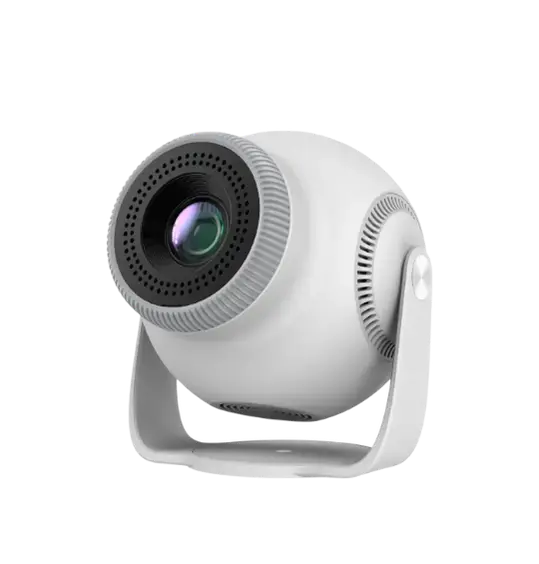
The TP360 Smart Android Projector brings the big‑screen experience straight to your living room, office, or outdoor space. With its native 720P HD resolution and 200–290 ANSI lumens brightness, you’ll enjoy sharp, vibrant visuals whether you’re watching movies, gaming, or delivering presentations. Its projection size of 40–130 inches transforms any wall into a cinematic display, making it ideal for family entertainment or professional use.
Running on Android 14, the TP360 offers seamless access to apps, streaming services, and wireless screen mirroring via MiraCast/Screen Cast. The Allwinner H726 chipset ensures smooth performance, while 1GB RAM and 8GB ROM provide reliable storage and multitasking capabilities .Compact and lightweight, this projector is designed for portability. Built‑in speakers deliver clear audio, while multiple connectivity options (Wi‑Fi, Bluetooth, HDMI, USB, and AUX) make it versatile for any setup. With a lamp life of 50,000 hours, the TP360 is built to last, offering long‑term value for both home and office users.
Model: TP360 Smart Android Projector
Display 2.69″ LCD
Resolution 1280×720 (HD 720P)
Brightness 200–290 ANSI Lumens
Projection Size 40–130 inches
Aspect Ratio 16:9
Operating System Android 14
Chipset Allwinner H726
Memory 1GB RAM / 8GB ROM
Connectivity Wi‑Fi, Bluetooth, HDMI, USB, 3.5mm audio jack
Audio Built‑in speakers
Lamp Life 50,000 hours.
Display Technology: 2.69″ LCD panel with Native 720P HD (1280×720) resolution
Brightness: 200–290 ANSI Lumens for clear visuals in dim or moderately lit rooms
Projection Size: Adjustable from 40 to 130 inches, perfect for home theater or presentations
Operating System: Latest Android 14 with MiraCast/Screen Cast for wireless streaming
Performance: Powered by Allwinner H726 chipset, 1GB RAM, and 8GB ROM for smooth playback
Connectivity: Wi‑Fi, Bluetooth, HDMI, USB, and 3.5mm audio jack
Audio: Built‑in speakers for immersive sound
Durability: Lamp life up to 50,000 hours, ensuring years of use.
Immerse Yourself in High-Definition Visuals
Native 720p Resolution with 1080p/4K Support: Enjoy stunningly clear images with a native resolution of 1280x720 pixels. The TP360 also flawlessly supports 1080p Full HD and even 4K video input, ensuring your content looks its best on a large screen.
Bright and Vivid Display: Boasting 150 ANSI Lumens (equivalent to 3600 marketing lumens) and a 2500:1 contrast ratio, the projector delivers bright, vibrant colors and deep blacks, even in moderately lit rooms.
Massive Screen Size: Project an immersive display ranging from 30 inches up to a colossal 150 inches, allowing you to customize your viewing experience based on your space.
Advanced LED Light Source: With an incredible lamp life of up to 50,000 hours, the TP360 offers years of maintenance-free operation, making it a cost-effective choice for long-term entertainment.
Smart Android OS for Endless Entertainment
Integrated Android 9.0 System: Access a world of content directly from the projector. Download and stream apps like Netflix, YouTube, Hulu, Amazon Prime Video, and many more from the Google Play Store without the need for additional streaming sticks.
Quad-Core Processor & Ample Storage: Powered by a robust Quad-Core ARM Cortex-A53 processor with 1GB RAM and 8GB ROM, the TP360 ensures smooth navigation and sufficient space for your favorite apps and media.
Screen Mirroring: Easily mirror content from your smartphone or tablet (both Android and iOS) wirelessly, making sharing photos, videos, or presentations incredibly simple.
Versatile Connectivity Options
Dual-Band Wi-Fi (2.4G/5G): Enjoy stable and fast wireless internet connectivity for seamless streaming and online browsing.
Bluetooth 4.2: Connect your Bluetooth speakers, headphones, or game controllers wirelessly for an enhanced audio or gaming experience.
Multiple Ports: Equipped with HDMI 1.4, two USB 2.0 ports, and a 3.5mm audio jack, the TP360 can connect to a wide array of devices including laptops, gaming consoles (PS5, Xbox), Blu-ray players, USB drives, and external speakers.
Built-in Speaker: A 3W integrated speaker provides decent audio for casual viewing, while the audio out port allows for connection to external sound systems for a truly cinematic sound.
Compact & Portable Design
Miniature Footprint: Measuring just 14.6 x 13.5 x 11.8 cm and weighing only 0.95 kg, the TP360 is incredibly portable, allowing you to take your big-screen experience anywhere.
Easy Setup: Manual focus and ±15° manual keystone correction ensure you can quickly get a clear, perfectly rectangular image no matter the projection angle.
Long-Lasting Performance
Efficient Cooling System: An optimized cooling system ensures stable performance and extends the lifespan of the projector, even during long hours of use.
Energy Efficient: With a power consumption of just 60W, the TP360 is an energy-conscious choice for your home entertainment needs.
Initial Setup
Placement: Place the TP360 on a flat, stable surface or mount it on a tripod (not included) at the desired distance from your projection surface.
Power On: Connect the power adapter and press the power button on the projector or remote control.
Focus & Keystone: Adjust the manual focus ring on the lens until the image is sharp. Use the keystone correction dial (or digital keystone in settings) to ensure the image corners are square.
Network Connection: Navigate to the settings menu on the Android interface, select Wi-Fi, and connect to your home network.
Connecting Devices
HDMI: Plug your laptop, gaming console, or Blu-ray player into the HDMI port. Select the HDMI input source from the projector's menu.
USB: Insert a USB flash drive or external hard drive into a USB port to play local media (videos, photos, music).
Bluetooth: Pair your Bluetooth speakers or headphones via the Bluetooth settings for enhanced audio.
Screen Mirroring: Use the pre-installed screen mirroring app (e.g., Miracast, AirPlay) to wirelessly cast content from your smartphone or tablet.
Navigating the Android Interface
Use the included remote control to navigate the Android 9.0 interface. You can download apps from the Google Play Store, browse the web, or access pre-installed streaming services. The intuitive layout makes it easy to find and enjoy your content.
Get our latest update in your email