.jpg?width=450)
৳6,680 ৳7,500
Quantity1
.jpg "Boya BY-PM700 USB Microphone")
.jpg?width=400)
.jpg?width=60)

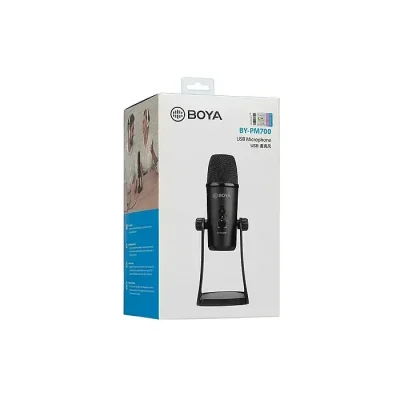
The BOYA BY-PM700 is a USB condenser microphone and is compatible with Windows, Mac Computers, and smartphones with a Type-C jack. Switchable Patterns and Triple-capsule Design Easily Meet All Your Needs. With Switchable polar patterns and Triple-capsule design, BOYA BY-PM700 provides cardioid, bi-directional, omnidirectional, and stereo pick-up patterns to allow you to choose any pattern more appropriate for your specific situation. Extremely Easy-to-use with an Integrated Multifunctional Knob With an integrated multifunctional knob and a 1/8" (3.5mm) headphone output.
BOYA BY-PM700 makes your user experience easier and more convenient. With the control knob, it can easily realize the mute function, headphone monitoring as well as recording volume precise control. Durable all-metal construction design With a Triple-capsule and Durable all-metal construction design, BOYA BY-PM700 includes a desk stand that can adjust the microphone in various desired angles, as well as the functionality of folding the mic down for storage and transport. Not just a Desk USB Microphone Wide frequency response and 24 bit/48 kHz resolution make BOYA BY-PM700 suitable for various situations, such as recording, interviews, conference calls, vocals, instruments, podcasting, streaming, and more.
Brand: Boya
Model: BY-PM700
Microphone Type: USB Microphone
Noise/Signal: 80dB
Frequency Range: 20-20000Hz
Sensitivity: 16 Bit/48 kHz
Output Impedance: >16ohms
Dimension: 112 x 108 x 200mm(4.4 x 3.8 x 7.9”)(Min.), 112 x 108 x 295mm(4.4 x 3.8 x 11.6”) (Max.)
Weight: 1042g(36.8oz)
Polar pattern: Stereo, cardioid, omnidirectional, and bi-directional
Connector: 1/8" Headphone Monitoring Jack
Power Module: 5V/150mA
Impedance: 16ohms
Power output(RMS): 130mW
Frequency Response:15-20,000Hz
System Requirements: Windows and Mac Computers
Includes: Integrated USB cable
Switchable Patterns and Triple-capsule design Easily Meet All Your Needs
With Switchable polar patterns and a Triple-capsule design, BOYA BY PM700 provides cardioid, bi-directional, omnidirectional, and stereo pick-up patterns to
allow you to choose any pattern more appropriate for your specific situation.
Extremely Easy-to-use with an Integrated Multifunctional Knob
With an integrated multifunctional knob and a 1/8" (3.5mm) headphone output, BOYA BY PM700 makes your user experience easier and more convenient.
With the control knob, it can easily realize the mute function, headphone monitoring as well as recording volume precise control.
Durable all-metal construction design
With a Triple-capsule and Durable all-metal construction design, BOYA BY PM700 includes a desk stand that can adjust the microphone in various desired
angles, as well as the functionality of folding the mic down for storage and transport.
Not just a Desk USB Microphone
Wide frequency response and 24-bit/48 kHz resolution make BOYA BY PM700 suitable for various situations, such as recording, interviews, conference calls,
vocals, instruments, podcasting, streaming, and more.
For Your Computer
Use this mic on Mac or Windows computers just plug it in and get started
Multiple Mic Modes for Any Kind of Content
The multiple mic modes allow virtually any kind of content creator to do their thing with precision and ease. Use Cardioid to reject off-axis noise, minimizing room tone while you speak directly into the mic. If you're recording with one other guest, select the Bidirectional polar pattern; now you can speak into the front, while the guest speaks in the back, and the sides of the mic will reject unwanted room noise. Choose Omnidirectional to pick up audio all around the capsule, which is great for work that features multiple voices. Finally, a Stereo mode is wonderful for ASMR content, or for recording music. A desktop stand and a USB cable are included.
All the Control You Need, Built Right In
The mic features controls for headphone volume, pattern selection, mute, and microphone gain—putting you in charge of every level of the recording process. If you're experiencing distortion or feedback while recording an especially loud source, simply adjust the microphone's sensitivity with the gain control. Or, if you want to take a break in the middle of a podcast, use the mute button.
3.5mm Headphone Jack
Simply plug your headphones into the mic's 3.5mm output, and you'll hear your broadcast-quality audio in all its glory.
Broadcast-Quality Digital Capture.
The mic records audio at 16-bit / 48 kHz, giving you the broadcast standard for media playback.
Simple to Set Up
Just plug the mic into your computer's USB port with the included USB cable, select it as a device in your recording software, and you're ready to get to work. The mic runs off your device's power, so no need to plug it into a wall. With the driver-free operation, you won't have to download pesky software to get it up and running.
All the Hardware You Need, Including
The mic comes with a desktop stand and a USB cable, so you can get up and running right away.
Page 1 of 3
Page 1 of 2
Get our latest update in your email
.jpg?width=192 "Plextone G30 PC Gaming Headset With Microphone Noise Cancelling...")